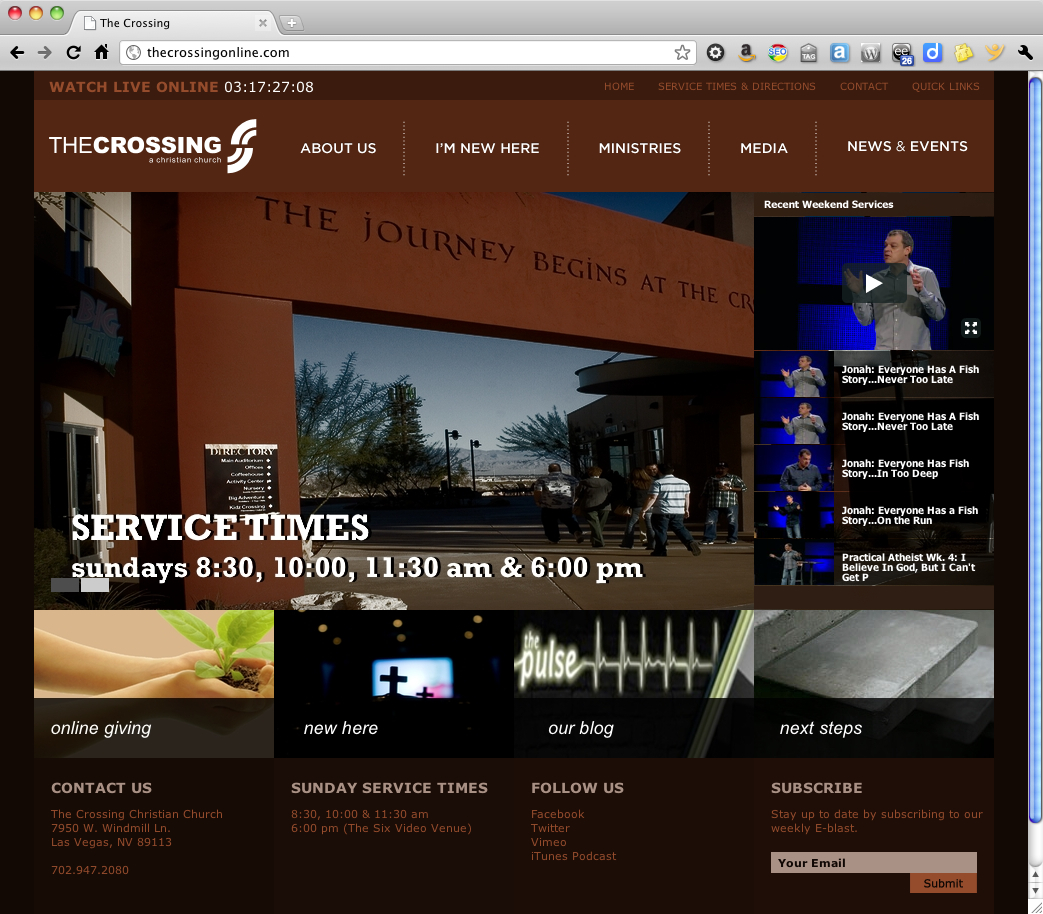
Most people, when they think of WordPress, assume it’s for hobbyists and bloggers, and the the design will look like a template. The Crossing proves this assumption wrong. The website isn’t a blog in the usual sense, but a great example of how WordPress can be used for pure content management with a unique style of its own.
For this project, my friends at PlainJoe Studios created the site design and architecture, with complete Photoshop mockups. Based on their design, I built a custom WordPress child theme using the StudioPress Genesis framework. The final product includes some great features, including a widgetized homepage, a dynamic video gallery fed via Vimeo, and slick access to the site map via the Quick Links in the header (give it a try!).
Best of all, the client can easily manage their own website content. And that is something to give praise for.
WordPress — it’s not just for blogging.
Do you need a website that works for you (instead of against you)? I can help. I have a network of design and developer resources that team together to deliver dynamic, high-performance websites. Our team is known as Room Five, and we’re here to help. Contact me for details.
On January 5, 2011, I committed to writing a post a day for 365 days. After 29 days, I’m happy to report that I’m on track with 29 posts in 29 days. All it took was a little nudge from Scott Berkun and the other good folks at WordPress.
Just about one month into the routine, I’ve made a few observations that might be of use to anyone else considering a similar challenge.
Writing a post a day takes discipline. In hindsight, I realized that I implied a post a day on this blog. That alone is a commitment (I already have a full-time career). And I promised “no fluff” — I want to write posts of the same quality that I like to read. Compounding the commitment are my work commitments and other websites, and you quickly see how a post a day is just the tip of the iceberg.
Planning is essential, as I noted in post #17/365. I’m using the draft status to collect ideas and thoughts on articles I want to write, or to align publication with related events. I collect my thoughts over days and weeks, and this has greatly simplified the process of sitting down to actually write the finished article.
Brainstorming helps, too! I tap into resources from Facebook and Twitter. I gain a lot of ideas from scanning my feeds on Flipboard or reading sites like The Daily Post which share topics and ideas for writing.
Most of all, the support of the community helps keep you going! I have the good fortune to have a great girlfriend who inspires me (check out her blog), and a number of friends in the local WordPress and social media community here in Orange County who keep me challenged. Many thanks go out to Darin McClure, Holly Schwartz, Suki Beasla and Matthew Gallizzi. We all meet at SMMOC several times a month, and all have taking up the call to write one post a day. And we use Twitter every day, encouraging and challenging each other to keep up the cause.
The icing on the cake? I’m having fun! I have a lot to write about — much more than I have time to write. So far there is absolutely zero chance that the well will run dry. That may be either a blessing or a curse depending on your opinion of my stuff, but I’m having a good time, and more than a few people are taking the journey with me.
It’s ironic. I kicked off this year with a photo project called Project 365, where I shoot at least one photo a day for the entire year. I had heard of this before from a friend, but decided to jump in and give it a shot. There has been a synergistic relationship between the two projects. Sometimes my photo of the day will spawn an idea that I simply must write about, and sometimes the article will inspire a creative photo.
How about you? Are you taking on a post- or photo-a-day challenge? Maybe you have in the past? What has your experience been?
I can see the headline now: “Time travel is now a reality,” says leading WordPress scientist.
One of the features that many people either 1. never learned about or 2. forget that it is there is the ability to schedule posts for publication at a specific date and time.
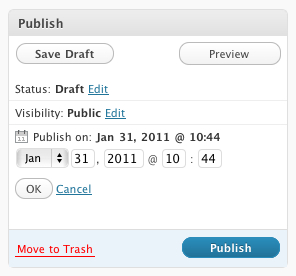
By default, when you initially publish a post or page, or save a draft, WordPress will grab the current date and time and use this as the publication date. You can override this to either back-date a post or post date for future publishing. This is great for scheduling posts when you know you want to announce something when you will be offline, or when you need to embargo information until a particular time.
To change the publish date, simply click the edit link in the Publish block and you’ll gave options to set the month, day, year and time of the post. Yes, time travel really is possible.
Note that if you select a date in the future, the Publish button smartly changes to a Schedule button. Pretty clever.
If you are going for consistency over time, another great tool is the Editorial Calendar plugin available in the WordPress plugin repository. This adds a new Calendar link in your Posts menu, which then displays a scrollable calendar showing all your posts plotted over it. From here you can add new posts, schedule posts for future publication and get a clear picture of when articles need to be ready. Here’s a screencast from the plugin author Zack Grossbart that shows all the bells and whistles.
I’m using this more and more as I add rigor to my publishing schedule as part of my project for 365 posts in 365 days. I’m able to slot in topics that I know I want to cover, and do it on a timeline that makes sense. I can collect my thoughts in a draft mode, then polish up the post before publication. If I finish early, I just schedule the post to go live on the selected date.
What tips and techniques do you use to manage your editorial calendar?
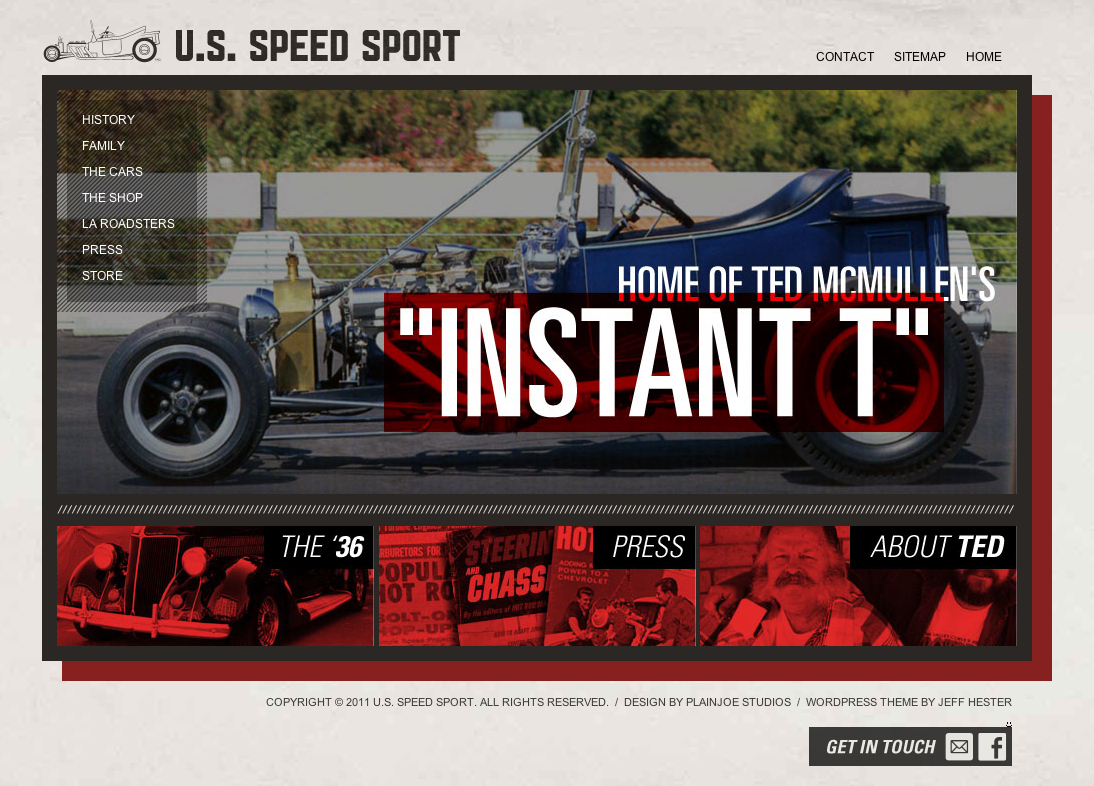
One of my latest projects went live this weekend. U.S. Speed Sport is devoted to the memory of one of the pioneers of hot rodding, Ted McMullen and his company U.S. Speed Sport.
It’s a WordPress powered site using a custom theme I built on the Studiopress Genesis framework. Why build on the Genesis framework? Genesis provides strong search engine optimization out-of-the-box, dead-simple WordPress upgrades and a great set of core widgets. Now the client can add pages, customize menus and change images on the homepage or headers without requiring a developer.
U.S. Speed Sport also uses Gravity Forms for intelligent form design and handling, and Slickr Flickr to integrate photo galleries hosted on Flickr.
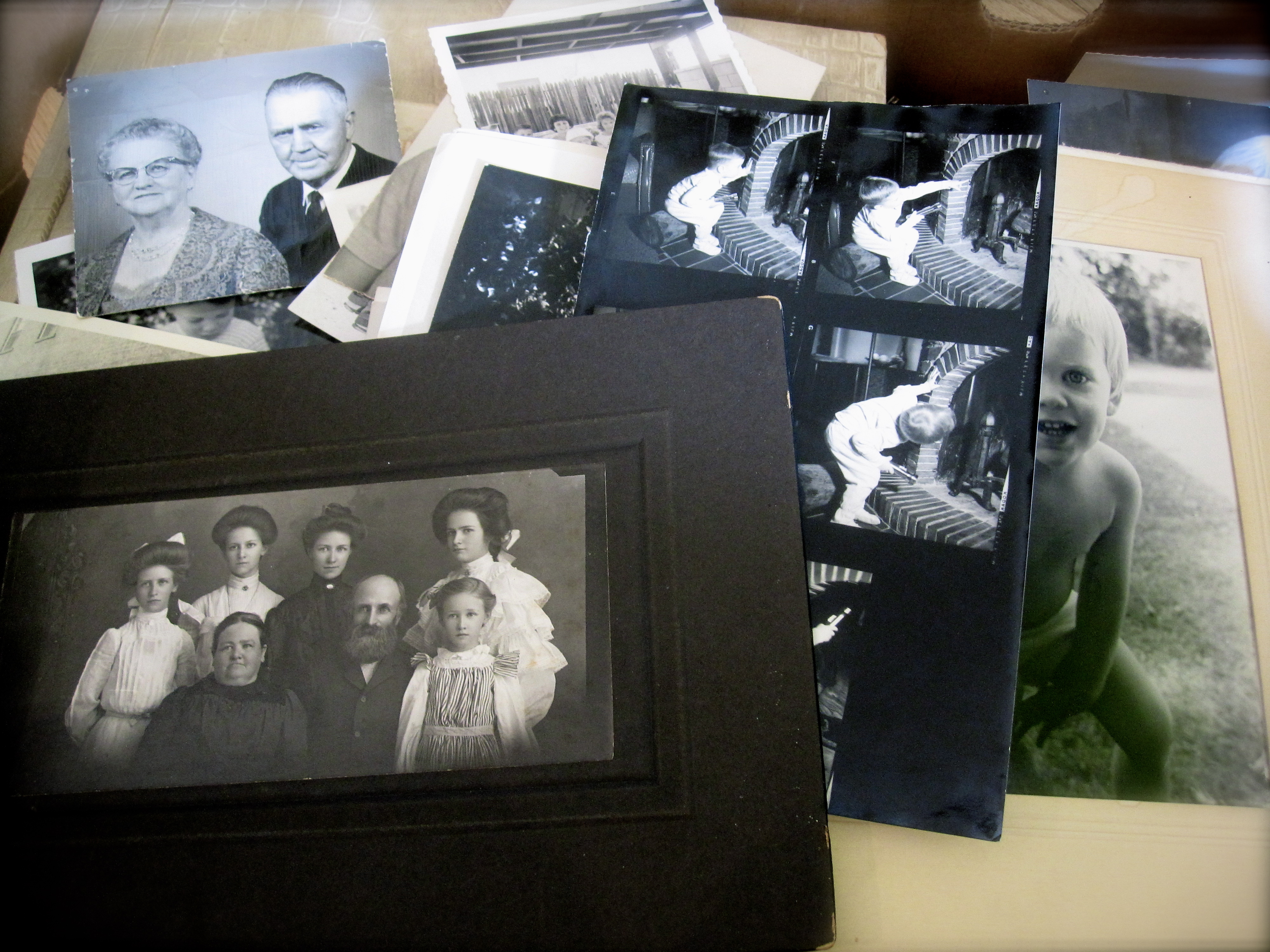
Last month, my grandmother passed away at the age of 95. Ruth Vanderploeg was in amazingly good health, living independently in the home she and my grandpa had shared for over three decades, walking regularly, entertaining guests and even teaching English. She suffered a massive stroke, and never regained consciousness. She passed away a few days later. She was a terrific woman, and I will always remember the difference she made in my life.
As our family gathered and began taking care of the house and belongings, we discussed what to do with the boxes of old photos. There were some terrific old photos of family and friends, some of them over 100 years old. A rich tapestry of family history that really belonged to all of us. We split up a few of the obvious ones — I got a lot of pictures from my childhood — and I suggested that for many of the others, we could share them online.
A big box of photos to scan
Why share them online?
First, our family is literally spread all over the world. My mom is in China, my brother in Denver, my kids in Tennessee, New York City and Maine. Aunt Mary lives in New Mexico, Pat lives in Eureka… you get the picture.
Secondly, in many of the photos we couldn’t place the location, date or even some of the people in them. Posting them online allowed the entire family to share their knowledge. “Oh yeah, that’s Uncle Alf!” or “That one’s from 1952!”
Finally, sharing them online would allow everyone a chance to download and print whatever they wanted, whenever they wanted. By sharing them on the web, we all have a copy.
How to Create a Photo Archive Online
The author in 1977. Nice afro!
One of the first things I had to do was decide where to share the photos. I considered Flickr and Facebook, but not everyone has (or wants) accounts on those platforms, and it was important that everyone be able to add comments. So I decided to create a photoblog using WordPress (which is free). I’ll be building it on the StudioPress Genesis framework (I already have a developer license) and starting with the Landscape child theme. I’m hosting it on my own server, and I’ll be creating a mailing list using MailChimp (also free up to 1,000 subscribers). And I’ll scan and upload several new images every week, along with an email update to the friends and family that have subscribed.
My plan is to have one photo per post, though I may group photos from a single event on the same post. Each post will be tagged with relevant names, places and dates. This way you could easily retrieve all photos of Grandma Moeller, or from a specific year or place.
Have you created a photoblog? Got any advice or tips to share? Leave a comment and pass them on. And I’ll be sharing updates on my progress as I get further into the project.
Creating content on a regular basis can be challenging. Some so-called blogging experts suggest that you need to post regularly to build your audience. That may be true if that aligns with your goals, but I agree with Scott Stratton’s theory. I heard him speak a couple months ago at a Linked OC event, and he reiterated what he says in his book UnMarketing (affiliate link): that quality is far more important than quantity. If you don’t have something that you simply must share, then it probably isn’t worth sharing.
Or as Scott puts it, people don’t share “meh.” People share emotion. People share what moves them. People share awesome.
On the other side of that coin is the view that as with anything, practice makes perfect. If you want to become a better guitarist, photographer or writer, you need to do that, and do so with some degree of frequency.
That, in part, is one of the ideas behind Project 365, a photography meme popular on Flickr and beyond. The idea is simple. Take one photo every day for one year, and share it online.
I first learned about Project 365 when my friend Ed took on the challenge, and I saw his photography improve by leaps and bounds. And so I decided on January 1st, it was my time to embark on that journey. I’ve started my first Project 365, and I’m looking forward to seeing the results this time next year.
So then yesterday I read on Mashable that the folks at WordPress had issued a similar challenge to the blogging world: write a post a day for a year. They’ve even created a website titled The Daily Post with ideas for writing.
Now those who have followed this blog on and off over the years know that I have been anything but regular about writing. I tend to write in frenzied spurts. But the idea of such a disciplined approach to writing was seductive, and I took the bait.
Yes, I realize I’m not starting this project on January 1st. There are no rules except for those I create, and those are subject to change. But from here on, I’m going to give it a shot… a quality post a day for the next 365 days.
Recently an update to the WordPress iPhone/iPad app was released in the iTunes App Store. One of the interesting new features is the ability to record, upload, attach and play videos directly within the app.
I know several people who would love to streamline and simplify the process of posting video in near real time, so I thought I’d give it a try and see how it works.
Unfortunately, it did not work, repeatedly crashing when uploading the video. The WordPress iOS forums lit up with problems, and the dev team resolved to pump out yet another update.
And so version 2.6.1 was released on the iTunes App Store today. Updating the app wasn’t good enough… I got “Communication Error” when trying to view my posts. The forums suggested deleting and reinstalling the app.
So far, so good. Now let’s see if it can handle video!




 By default, when you initially publish a post or page, or save a draft,