Posted on Leave a comment

Knowledge Management on Twitter: Who to Follow

KM_influencerTwitter is increasingly a popular way to connect with experts across a variety of fields. Finding the people you know is easy enough, but how do you discover people who are actively tweeting about the topics you’re interested in? For me, I’m interested in a number of subjects, but of particular interest is the field of knowledge management — helping connect people to share and leverage knowledge and expertise.

On the subject of knowledge management, MindTouch has attempted to do just that — creating an annual list of the Top 100 Influencers in KM. While I’m honored to be included on the list (at #53), I should point out that it’s far from perfect. The list evaluates Twitter users, based on their use of the #KM and #KMers hash tags. If you’re a key influencer who does not use Twitter, you’re not on the list. If you’re a key influencer who doesn’t use the key hash tags, you’re also not on the list (sorry @elsua).

Continue reading Knowledge Management on Twitter: Who to Follow

Posted on 3 Comments

Customer Service, Social Networks and Fixing What’s Broken

Break Free

It’s easy to pick on the cable company. Most of them are easy targets for derision. The services are overpriced and the customer service often ends up the butt of jokes.

I’ve had my own ups-and-downs with my current cable company — Time Warner Cable. Most recently, this centered around a single episode of a single show: Homeland, Season 2, Episode 11.

The Backstory

I have been catching up on the Homeland Season 2 replay on Showtime, recording episodes using a Season Pass on TiVo. For whatever reason, episode eleven eluded the long arms of my HDR while we were away in Sonoma. My challenge? How to legally get the missing episode.

The first option would normally be to use the on demand functionality provided through TWC. Unfortunately, because I use a TiVo box with a cable card, the on demand functionality is not available.

HBO has a great app for the iPad that lets you view pretty much any episode of any of their series, going back for years. You can even view it via AirPlay and your Apple TV. Too bad Homeland is on Showtime. Fortunately, Showtime also has an iPad app with similar on demand playback. Unfortunately it only works with certain cable providers — and TWC is not one of them.

Fortunately, TWC has it’s own iPad app called TWC TV which provides on demand functionality, including Showtime series (if you’re a subscriber, which I am). This was promising. I searched for Homeland, found Season 2, clicked on Episode 11, and… FAIL! It would not play. Check episode 10. That works. Episode 12? That also works. Episode 11 is the only episode that won’t play.

Calling TWC customer service led to the typical, unfulfilling canned responses. “Are you able to play other episodes?” Yes. “Have you tried the on-demand feature on your TV” No, I cannot because I use a cable card and a TiVo, not a cable box. “Have you tried reinstalling the TWC TV app?” Yes, with the same results. Finally they were able to confirm with another tech who had an iPad that they, too, could not play Homeland, Season 2, Episode 11. The answer? They would have to re-load the episode on their on-demand server, and to keep trying in a few days. I would not get any notification when (or if) it were resolved.

Two weeks later. Episode 11 will not play. In fact, it’s disappeared from the episode list entirely.

homeland-error

This time, a tweet was in order.

Next, TWC is calling me, to help sort out the problem Again, we repeat the dance. “Are you able to play other episodes?” Finally, I get them to realize (again) that the problem is with that particular episode on their server. And again, the solution? Wait a few days and try again.

Frustrated, I finally decide to bring the cable box out of the closet, dust it off and hook it up. Had to dig out a couple coaxial cables and a splitter, and add to the tangle of cables. Finally, it’s all hooked up. Fire up the cable box, press the “on demand” button and… FAIL. Ugh.

One more phone call to TWC support, and they send a signal to the box. Finally it’s working  (though still not on the TWC TV app).

The Lesson Learned

There’s a few lessons in this experience. First, it was interesting to note that TWC is actively monitoring Twitter. It’s a smart move for them, even though they weren’t able to actually solve the problem.

 …Remember, these days, when you’re talking to one person, you’re talking to a thousand. -Zoe Barnes, House of Cards

From a consumer perspective, I got more intelligent response from a tweet than from a phone call to their toll-free customer service line. Of course I made a point of mentioning the TWC twitter account, but it got action–and more intelligent action–much faster. Social networks empower consumers.

Which leads to the more important lesson. Having responsive customer service is only meaningful if you can actually fix the problem. In this case, TWC failed. Granted, it may be fixed eventually, but they weren’t equipped to resolve the issue even after several weeks. It’s a problem of bureaucracy, and a symptom of broken processes in the organization. The real problem for TWC in this case is not one of sloppy customer service, but an inability to fix what’s broken with their own internal processes.

A Broader Application

All of this begs the question: What’s broken in your company? In your organization? In your life or relationships? If the experience sucks, something must change. Fixing the problem involves change. Embrace the change. 

Insanity: doing the same thing over and over again and expecting different results. – Albert Einstein

Postscript

For what it’s worth, I was finally able to watch Homeland, Season 2, Episode 11 last night. And yes, it was worth it.

Photo credit: Nickwheeleroz on Flickr

Posted on 5 Comments

Social Media Explained (with Donuts)

Social media takes on many forms, and is ever-evolving. This infographic explains the common perceptions behind some of the popular social media applications, illustrated with a use case that we can all relate to: donuts.

Social media explained with donuts

[jpshare]

You can quibble over the inclusion or exclusion of particular social media applications, but the intent remains much the same.

What exactly does this tasty infographic imply? Each social media application serves a unique purpose.

Twitter allows people to share brief updates and popularized the concept of #hashtags that has spread to Instagram and is now spreading to Facebook and Flickr. Of course, the real value for me is to connect with people around a subject (usually based on a hashtag), collecting and sharing ideas. Personally, this has been extremely useful to me in keeping up with the latest on #KM (knowledge management) and #hiking (my weekend passion).

#Hashtag Trivia: Chris Messina was the first to suggest the use of the hashtag in Twitter, back on August 23, 2007.

Facebook makes it really easy for people to share what they like, and in the process, collects valuable demographic information about you that they can sell to marketers. Mark Zuckerberg has promoted the concept of frictionless sharing, making it even easier for them to know what makes you tick. The benefits to you? The social graph search. This also benefits marketers. With over one billion users, is Facebook too big to fail?

Location-awareness application Foursquare gives you the opportunity to check-in at restaurants, stores, and businesses. The initial idea was that your friends in the area might see that you’re at a certain bar, and that would prompt them to join you. That never really took off (at least for me… my friends are apparently privacy-shy Luddites) but it has evolved in to a useful app for finding tips, recommending places near you, and even occasionally offering discounts and special offers for checking in. Facebook and Google have both been trying to get in on location-awareness for local marketing, but no clear winner has emerged.

Instagram isn’t the only smartphone photo-sharing application out there, but it’s one of the most popular. Instagram’s major innovation wasn’t the groovy, retro-photo filters that people either love or hate, but that it launched as a mobile-only social network. When they launched, you could only view or interact via your mobile phone. That’s since changed, but they recognized that a significant shift had occurred — we use mobile devices to connect to the Internet more than traditional computers.

YouTube has given everyone a chance to become a video star, and established itself as a black hole that bends time like nothing else. I’ve only dabbled with YouTube publishing, but some people have embraced the social network capabilities, using them to connect with others in new ways. And almost everyone I know ends up viewing a few videos on YouTube at some point during their week. For higher quality content (but lower views) check out Vimeo.

While most of the social media tools listed are primarily for personal use (and yes, I know there are businesses using all of them), LinkedIn is squarely focused on professional networking. Connecting with colleagues and clients takes precedence over grumpy cat photos and selfies. Although some people find LinkedIn boring, the focus on business is what sets it apart.

Pinterest approached the idea of sharing content from a fresh angle, letting people “pin” their favorite things to a board. With a focus on great images, it really took off, especially with women. Dozens of copycats have tried to replicate their success, but none have come close.

Many people haven’t heard of Last.fm, but this venerable social network has been capturing music listening habits for many years. Last.fm lets you autoscrobble the songs you play and–over time–knows what artists, genres and songs you like the most. Based on that, it can recommend new artists that it thinks you’ll enjoy, and can connect you with other people who share your taste in music. I’ve setup Last.fm to scrobble my plays on iTunes and Spotify, and occasionally listen to the Last.fm app on my Xbox, streaming music through my home theater system.

The punchline in the infographic is Google+. Of course, many, many more people use Google+ than just the folks employed there, but from the people I know, they are the early adopters. Google likes to tout high adoption numbers, but their figures are murky; clouded by the inclusion of users of other Google apps like Gmail. How many people really use Google+? We may never know. But they have a lot of potential users.

The Business Case for Social Media

Most people look at these social networks as primarily targeted at consumers, using them for the personal benefit. But that doesn’t mean the companies don’t have a business focus. And while all of these products are free for you to use (although some offer premium versions), you should remember this advice:

If you are not paying for it, you’re not the customer; you’re the product being sold. – blue_beetle

Advertisers and marketers love the rich demographic data available as a result of our living out loud through social media. This helps them deliver highly targeted advertising that you are (theoretically) more inclined to find useful. And it gives advertisers the tools to hyper-refine the targeting of their messages. Instead of merely targeting camera enthusiasts they can target female Canon DSLR enthusiasts in the Los Angeles area. Hyper-targeting.

And though they were the punchline of my infographic,  Google stands to gain handsomely from all of this data. They reign supreme as King of Search. And as their other suite of applications grows, they gain further opportunities to aggregate, correlate, and repackage you to advertisers.

So WIIFM?

What’s in it for me? Why do I use these various social networks? I use them to make new connections, and strengthen existing ones. I also use them for my personal data collection, as I grapple with the concepts behind the quantified self and how to apply that data for positive change.

What about you? What do you get out of social media? What do you love (or hate) about these tools?

Posted on 1 Comment

Connected, The Film

Every month a terrific group of bright minds meets in Los Angeles to share, challenge, drink and discuss how we can live an enlightened life. The gathering is known as Mindshare, and if you live anywhere within driving distance of downtown LA, I highly recommend it.

This past Thursday, Mindshare hosted a preview screening of Tiffany Shlain’s new film: Connected.

Connected takes on what it means to be connected in the 21st century. How does technology factor in? Why do we connected? Is our growing interdependence the next step in human evolution?  Shlain went in with this vision, but as so often is the case, life gets in the way. In her case, it was the cancerous brain tumor in her father, and her own high-risk pregnancy that caused her to tweak her vision for the film in a personal way.

The end result wasn’t revolutionary or mind-bending. The key premise is that we are evolving as a species, specifically by becoming more interdependent. To continue to grow, we must connect with each other — rely on others — and build stronger connections not only between the two hemispheres of our own brain, but between each other. The ideas are not ground-breaking. But Shlain tells the story in a way that is both personal and memorable.

Connected is currently playing in Los Angeles at the Arclight in Hollywood. If you get a chance, check it out.

Posted on 3 Comments

Follow Friday: #CoWorkers

Follow Friday has been a long-standing meme on Twitter where users recommend people that their followers might also like. Today, I’m going to share some folks that I’ve met through a Facebook group known as #CoWorking. Some of these people I’ve met in person. Some I know better than others.  But all of them are actively engaged through social media and a range of social networks.

As much as possible, I’ll let them speak for themselves through their own tweets, and only comment where I warranted. Oh, and if you’re so inclined, you can follow me on Twitter, too.

[blackbirdpie url=”http://twitter.com/#!/staceysoleil/status/107166207060361216″]

Stacey is a social media maven. She’s founder of #CoWorking and very active in the SoCal social media scene.

[blackbirdpie url=”http://twitter.com/#!/sbeasla/status/107129066536181760″]

Suki is a SoCal foodie with social media prowess.

[blackbirdpie url=”http://twitter.com/#!/Snakkle/status/106848406919577600″]

Snakkle is not just a weird name, it’s the official Twitter channel for Snakkle.com – a site that specializes in cataloging photos of celebrities before they were famous. Silly fun.

[blackbirdpie url=”http://twitter.com/#!/Smandi8/status/106317978307534849″]

Mandisa is a publicist in South Africa.

[blackbirdpie url=”http://twitter.com/#!/sbhsbh/status/107086646045974528″]

Steve Hughes is based in New Jersey and tweets about social media, sports, and SEO (among other things). I don’t know if he visits tanning salons.

[blackbirdpie url=”http://twitter.com/#!/kimgarst/status/107166020640309248″]

Kim Garst runs SocialMediaBranding.com in Tampa, Florida.

[blackbirdpie url=”http://twitter.com/#!/SuryaRay/status/107093658993565697″]

Surya lives in New Delhi and is active on Empire Avenue.

[blackbirdpie url=”http://twitter.com/#!/DniseSonnenberg/status/107144342090678272″]

Denise is a social media consultant and also active in the SoCal social media scene. And I’ve hiked with she and her husband!

[blackbirdpie url=”http://twitter.com/#!/cindyronzoni/status/107163164705173504″]

Until I met Cindy (she’s active in the local social media and WordPress community here in So Cal), I had no idea that people in Orange County were into any form of curling that didn’t involve irons.

[blackbirdpie url=”http://twitter.com/#!/VillaCucina/status/106846280654925824″]

Villa Cucina is the official Twitter account of one of my favorite little stores in downtown San Clemente. It’s maintained by Christina Morgan.

[blackbirdpie url=”http://twitter.com/#!/MingleMediaTV/status/107173048473501696″]

MingleMediaTV hosts both live and produced web TV programming.

[blackbirdpie url=”http://twitter.com/#!/Gabriella51/status/107171496505524224″]

Gabriella needs to change her Twitter font color!

[blackbirdpie url=”http://twitter.com/#!/juliefogg/status/106779350594105344″]

Julie tweets about VoIP, call centers, Avaya and the “Immersive Internet.”

[blackbirdpie url=”http://twitter.com/#!/alisonstripling/status/106804649788579840″]

Alison consults with businesses needing help with social media.

[blackbirdpie url=”http://twitter.com/#!/campusexplorer/status/106785784979390464″]

CampusExplorer tweets news, advice and tips for preparing for college.

[blackbirdpie url=”http://twitter.com/#!/DvinMsM/status/106875061448867841″]

[blackbirdpie url=”http://twitter.com/#!/LifeAfterKidsTV/status/106877443486400512″]

Marla Schulman hosts a couple of webcam shows, proving Seth Godin right — we can all be creators!

As you can see, there’s a heavy focus on social media (not surprisingly). If you’re looking to connect with people that can help you sort out what works and what doesn’t, give them a follow.

Want to be followed by me? Leave me a comment with your Twitter handle or retweet this post!


Posted on Leave a comment

LinkedIn: You Are One in a Hundred Million

Earlier this week, LinkedIn registered their 100 millionth member. They are currently registering a new member at the rate of one per second. While the number still lags behind Facebook, it is a significant milestone and shows strong growth for the professional networking service.

I first heard about the milestone when I received (along with a million others) the following email from Reid Hoffman, co-founder and chairman of LinkedIn:

Dear Jeff,

I want to personally thank you because you were one of LinkedIn’s first million members (member number 548570 in fact!*). In any technology adoption lifecycle, there are the early adopters, those who help lead the way. That was you.

We hit a big milestone at LinkedIn this week when our 100 millionth member joined the site.

When we founded LinkedIn, our vision was to help the world’s professionals be more successful and productive. Today, with your help, LinkedIn is changing the lives of millions of members by helping them connect with others, find jobs, get insights, start a business, and much more.

We are grateful for your support and look forward to helping you accomplish much more in the years to come. I hope that you are having a great year.

Honestly, I have not been a very active LinkedIn user until recently, and I am still learning the ropes. But if you haven’t checked it out, it’s probably time for a fresh look. That’s why I’ve signed up for Neal Schaffer‘s upcoming LinkedIn Workshop on April 19th at SMMOC Labs.

Neal is an recognized LinkedIn expert and author of Understanding, Leveraging and Maximizing LinkedIn. He held a similar workshop back in the fall and got rave reviews. It’s a hands-on workshop — bring your laptop and be prepared to take specific steps that will help you get more value from LinkedIn. Join me there, and feel free to connect with me on LinkedIn.

So What Does 100 Million Members Look Like?

Here is a great infographic that illustrates what 100,000,000 members looks like.


Posted on 4 Comments

What is Memolane?

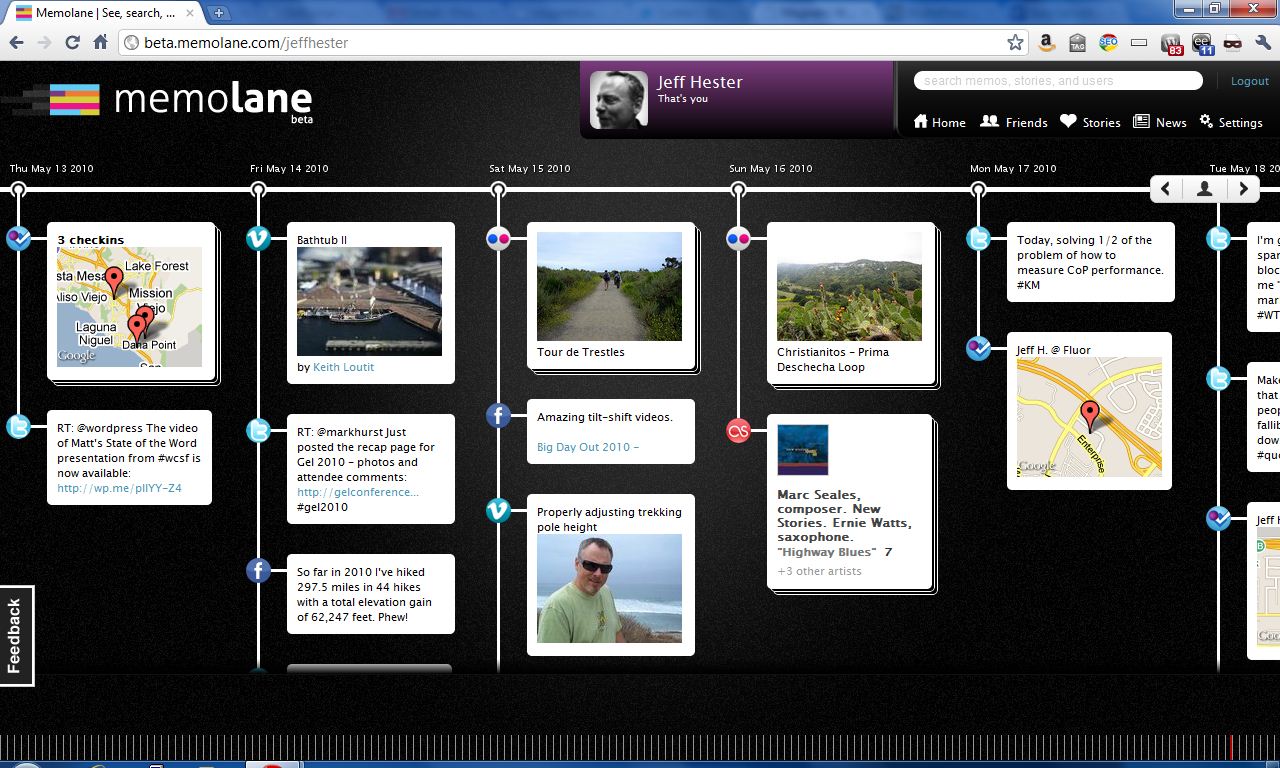
It’s been said that everything you do or say on the Internet is there for ever. But even with all the various websites and services we use, it’s still not easy to collect all those tweets, posts, photos and other artifacts in a organized way. Flavors.me does a fair job of aggregating this data, and Facebook is doing more and more aggregation. But neither of these attempt to take a historical look back at your activity. This is where Memolane attempts to fill the gap, creating a digital timeline of your contributions.

Currently in beta, Memolane allows users to configure a variety of popular services and then automatically collects them in a timeline. The services supported include Facebook, Twitter, Flickr, Last.fm, Picasa, RSS feeds, YouTube, Vimeo, Foursquare and TripIt, with support for additional services promised.

The results are pretty amazing. You can scroll back through time and see where you checked in, what you tweeted, what photos you posted and so on. Across the bottom of the screen is a series of vertical lines that represent a granular view of time that lets you quickly scroll through years of data. Slick!

You have control over whether you share this publicly or not, but I noticed some glitches. For instance, if you have photos marked private on Flickr, they still come over into your Memolane timeline. Depending on your Memonlane settings, they may be visible in your “lane” regardless of your Flickr settings. Not great, but then it’s still in beta.

If you’re interested, you can check out my Memolane here.

UPDATE: Beta Invites

Memolane Community Manager Meghan Krane graciously gave me an invite code to share with you (thanks, Meghan!). If you’d like to try Memolane for yourself, sign-up here using the invite code “hester”.